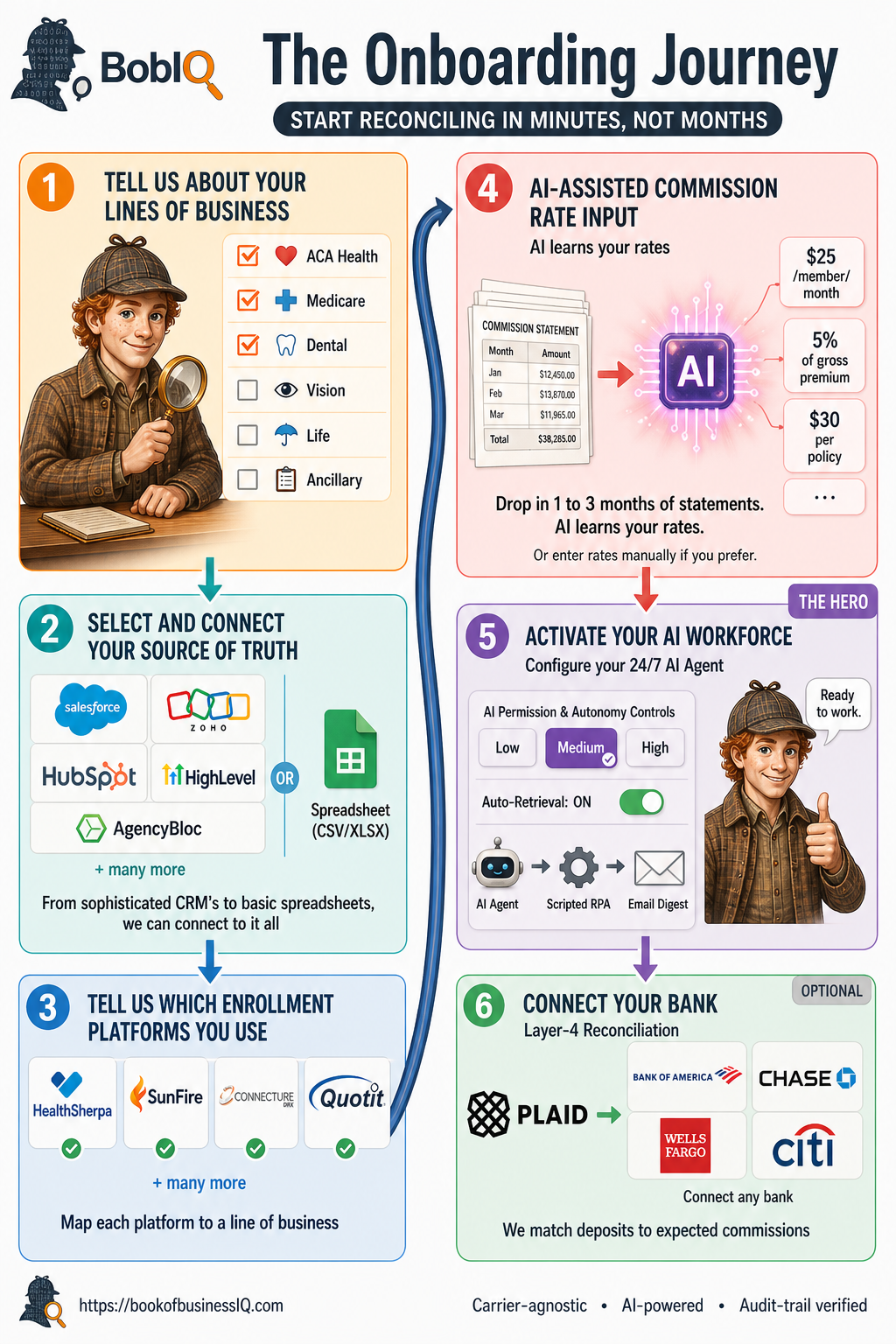
The Onboarding Journey

From sign-up to fully automated.

Six steps. No consultant. Most agencies are reconciling within an hour of signing up. Here's exactly what to expect.

~30 min total setup 0 consultants required Day 1 reconciling
The Whole Picture

Six steps. One screen.

The BobIQ Onboarding Journey: Tell Us Your Lines of Business, Select Source of Truth, Connect Enrollment Platforms, AI-Assisted Commission Rate Input, Activate Your AI Workforce, Connect Your Bank (Optional)
1 Lines of Business

Tell us what you sell.

~2 minutes

Check the lines of business your agency writes. Bob uses this to set up your carrier list, commission structures, and reconciliation rules from day one. Health agencies look very different from P&C agencies - this lets Bob configure correctly.

  • Pre-built defaults for ACA Health, Medicare, Dental, Vision, Life, Ancillary
  • Add custom lines if you sell something unusual
  • Toggle any line on or off later as your book changes
  • Each line gets its own carrier list and commission rules
Tip Don't sweat this. You can change it any time and Bob will reconfigure on the fly.
Step 1 / 6 Lines of Business
❤️ACA Health
Medicare
🦷Dental
👁Vision
Life
Ancillary
2 Source of Truth

Connect your CRM. Or your spreadsheet.

~5 minutes

Pick the system where your client and policy data lives. Bob meets you where you are. If you have a sophisticated CRM, great. If your book is in a spreadsheet, also great. Bob connects to both with the same care.

  • Native connectors: Zoho, Salesforce, HubSpot, GoHighLevel, AgencyBloc
  • Generic CSV/XLSX import for any other system
  • Two-way sync available where supported
  • OAuth and API key authentication, never passwords
  • Field mapping wizard handles custom fields automatically
No CRM yet? Pick "Spreadsheet" and upload a CSV. You can connect a CRM later without losing any work.
Step 2 / 6 Source of Truth
Zoho
Salesforce
HubSpot
HighLevel
AgencyBloc
CSV / XLSX
Connected to Zoho CRM · 1,247 contacts synced
3 Enrollment Platforms

Tell Bob where you enroll.

~3 minutes

Connect each enrollment platform you use. Map each one to a line of business. Bob handles the import and the ongoing sync - you don't have to remember to download anything ever again.

  • HealthSherpa, SunFire, Quotit, Connecture, and more
  • Per-platform authentication via OAuth or session capture
  • Each platform maps to one or more lines of business
  • Bob syncs daily and detects new enrollments automatically
  • Historical enrollment data imported on first sync
Already have exports? Drop them in. Bob will use historical exports while the live sync gets going.
Step 3 / 6 Enrollment Platforms
HealthSherpa
SunFire
Quotit
Connecture
Stride Health
+ many more
2 platforms connected · mapped to ACA + Medicare
4 AI Rate Learning

Drop in 1 to 3 months of statements. Bob learns your rates.

~10 minutes

Upload commission statements from each carrier you work with. Bob reads them, identifies which carrier they're from, and learns your commission structures automatically - flat rate, percentage of premium, per-member, new vs. renewal differentials, all of it.

  • CSV, Excel, and multi-page PDF formats supported
  • 80+ carriers pre-configured with parsers
  • AI learns any new carrier's format on first upload
  • Detects flat-rate, percent-of-premium, per-member, and graded structures
  • Or enter rates manually if you already have them documented
Why 1-3 months? More statements = more confident rate learning. Bob can run with one month, but three months catches new vs. renewal differentials and seasonal patterns.
Step 4 / 6 AI Rate Learning
Statements
Aetna$12,450
Cigna$8,120
Anthem$15,890
3 mo total$36,460
Learned Rules
Aetna · $25/mem/mo
Cigna · 5% gross prem
Anthem · $30/policy
+ 12 more
5 Activate AI Workforce

Set Bob's autonomy. Turn him on.

~2 minutes

Pick how independently Bob operates - Low, Medium, or High - and turn auto-retrieval on. From this moment forward, Bob is a 24/7 member of your team, retrieving statements, reconciling records, and investigating discrepancies through three retrieval tiers.

  • AI Agent: logs into supported carrier portals and downloads directly
  • Scripted RPA: scheduled retrieval for portals without an API
  • Email Digest: forward carrier emails, Bob extracts the statement
  • Autonomy applies to carrier emails, CRM updates, and reports
  • Change autonomy at any time - no restart needed
Most agencies start on Medium. Bob drafts everything, you approve. Three months later most users move to High once they trust the patterns.
Step 5 / 6 Activate AI Workforce
🤖
AI Agent
Direct portal access for supported carriers
Scripted RPA
Scheduled retrieval where APIs aren't available
Email Digest
Forward carrier emails, Bob extracts
Autonomy Level
Low
Medium
High
6 Bank Connect · Optional

Add Layer 4. Match deposits to expected commissions.

~3 minutes (optional)

Connect your business bank account through Plaid to add the fourth reconciliation layer. Bob matches actual deposits against expected commissions, catching the rare case where a carrier statement says one thing and the deposit says another.

  • Read-only access via Plaid - we never see your bank credentials
  • Works with any U.S. bank Plaid supports (12,000+ institutions)
  • Only deposits matching carrier commission patterns are categorized
  • Skip this step entirely - Bob still works at 92%+ reconciliation
  • Add it later if you decide you want the extra precision
Why optional? Many agencies don't want a third party touching their bank. Bob still gets to ~92% reconciliation without it. The fourth layer just gets you to 100%.
Step 6 / 6 Bank Connect
PLAID
Bank of America Chase Wells Fargo Citi + 12,000 more
Bob matches every deposit against expected carrier commissions. 92% → 100% reconciled.

That's it. You're reconciling.

Bob is now retrieving statements, cross-checking layers, and investigating discrepancies on your behalf. You'll see your first action queue items within 24 hours.